Friday, February 15, 2019

VXDIAG Ford Mazda IDS V112 free download and native install

Offer VXDIAG Ford Mazda IDS V112 official free download source and native installation guide. Native installation features: easy to operate, have lower requirements to the computer configuration, no need to switch the port etc.

VMware Player version and Native version difference:
  1. Run in virtual machine: to run the original IDS software on VXDIAG Nano interface, you need the correct activation code, therefore, the user is advised to active in the virtual machine and copy to use. However, some user may came across problem because of the computer performance etc.

  1. Native installation: from IDS 112, it starts running natively instead of virtual machine. Native installation features: easy to operate, have lower requirements to the computer configuration, no need to switch the port, as long as the patch is newest, the official newest version can be compatible with the VXDIAG interface (VXDIAG VCX NANO and VXDIAG Multi Diagnostic Tool with Ford Mazda)

V112 native version download link supplied by obdexpress.co.uk engineer:
Ford IDS v112:
https://mega.nz/#F!EpoUnSgL!2my58LmoP1ljhKagIqEDTA?BkICxCpL

Mazda IDS V112
https://mega.nz/#F!AtgDTQpK!75YJKyupVlz4aJwCsjE7Rw?U0Rm1SwA

Ford Mazda IDS Patch
https://mega.nz/#F!AooiHQrR!WsDPAmflZTrFsaKmLT7G8w

OS: WIN 7, 8 10

Ford IDS v112 and Mazda IDS V112 native installation:
Installation steps:
  1. Install the official IDS diagnostic software and restart the computer after completion;

  1. Install VCX client VX MANAGER, and install FORD type drive at the time point;

  1. Connect to the Ford VCX device and click “Ford_IDS_FIx.exe”. After installation, you will be prompted to create shortcuts on the desktop.

Note:
  1. In the future, when using VCX to diagnose Ford, we must click on “Ford_IDS_FIx.exe” to run the diagnostic software. Clicking on the original IDS is not diagnosable;

  1. The diagnostic software must be installed first, and the device driver must be installed.

Who Like This Article Also Viewed:

Thursday, January 24, 2019

ODIS 5.0.6 PostSetup 76.0.20 Launcher + License free download

You can find here full ODIS 5.0.6. No need for any key and it’s full with full language pack
(Audi, VW Passenger and Commercial, Skoda, Seat, Bentley, Lamborghini, Bughatti , Man Trucks)

ODIS 5.0.6 Download:
https://mega.nz/#F!51F3WCaa!Kovg-8LI3Qu1ojNAmwrNng
PW: hoangtai
*** Please use 7zip so you can extract the files without any errors Wink.
it work with VAS5054 interface.
odis-5-0-6-01


Step 1
======
Install Setup + license and reboot

Step 2
======
Do not run ODIS
Replace files ( Launcher )
and change Softing 1.20.42
C:\Program Files (x86)\Soft
or
C:\Program Files\soft
Step 3
======
Run Odis and install PostSetup

*** Note: the softing folder is in program data, you might have to change your folder view as its hidden.

Image 1: ODIS-E 9.0.4
odis-e-9-0-4-02


Image 2: ODIS-S 5.0.4
odis s-03


Image 3: PostSetup 76.0.20
odis-5-0-6-04


***
Thanks and reputation to mhhauto.com member hoanganhtai.
Anybody who test ODIS 5.0.6 PostSetup 76.0.20 at your own luck.

HOWEVER
If you think it doesn’t matter to use the lower version which is already tested working safe and stable, you can use ODIS V4.4.1 Post Setup 69.0.20, which works with VAS5054A with full pack.
odis-4-4-10-05

odis-4-4-10-05-

Tuesday, January 22, 2019

Scania SDP3 2.38.2 Software Free Download:No pass

Scania SDP3 2.38.2 free source download incl. activation; also 100% safe source with installation and activation with teamviewer.

Source 1: Free, unknown security
SDP3 2.38.2 free download : No pass
https://mega.nz/#!xo8GXIjQ!twFx3cbGUptyDkGmFa2gNn3Zy0CjB-44_Kfi_vZyT4g
768.4 MB

SDP3 2.38.2 Activation : No pass
https://mega.nz/#!ggNRlQKT!qyW5szrArUf6Y7kEwlXFyGmMkVA0H08XbvqmEEWRpqk
9.0MB
1) Install run admin 1.bat
2) Restart the PC
3) Install sdp3 2.38.2 and restart
4) Install driver 32 or 64 Bit
5) Run “Hardware ID Reader” copy ID machine
6) Run “Protection REG” paste up ID machine —> click in “Decode Fingerprint” —> click in “Generate” —> a .reg file is generated in the folder
7) Run clik .reg file and apply in registy
8) Copy and replace in the program folder 2 file “Fix 2.38.2”
9) Run install “ScaniaSDP3Time Add 2 Year”
10) Restart PC

Thanks to the contribution of skud1 (mhhauto.com forum member).
This poster is just sharing helpful info.

Source 2: 100% safe
Scania SDP3 V2.38.2

* They help install and active with TeamViewer(No charge)

* **Works on WIN 7 sp1 ultimate edition 32 or 64; WIN 7 pro sp1  just 32 bit ; WIN 10 pro
Need Netframework 4.5 installed on system. windows 7 will be better.
In order to install SDP3, administrator rights are required.
Note: The USB key and VCI must not be connected to the computer during the installation of SDP3, especially not if SDP3 is installed for the first time.
The communication problems related to Windows 8 is now solved. Some problem solving reconfigurations was made Thursday the 16th of October.

* Multi-language: English, German, Spanish, French, Japanese, Dutch, Persian, Polish, Portuguese, Swedish, Norwegian, Suomi, Turkish, Italian, Czech, Russian, Chinese.

Capabilities:
Check and adjustments…OK
Conversion…OK
Maintenance…OK
Campaign…OK
Bodywork…OK
Fault Codes…OK
Fault Reporting …OK
Programming of Control units  …OK


Tuesday, January 15, 2019

Free Download Ford IDS V109 for VXDIAG VCX NANO/VCM2

Free Download VXDIAG Ford IDS V109 software
https://pan.baidu.com/s/1HE9eXRVoxiXjeF9mOeXFDw 
password: o8ax
Software version: IDS V109
Compatible device : VXDIAG VCX NANO for Ford, VCM2 clone using VXDIAG solution
Operating system: Windows vista, Windows 7, Windows 8.1, Windows 10 32 and 64 bits


(contact vxdiagshop customer service if download link is invalid)

VXDIAG Ford V109 Info:
  • This version requires an internet connection to be available at the time of connecting to vehicles to download the latest calibration / software files from Ford’s server if you wish to upgrade your vehicles software. A mobile hotspot on an Android/iPhone works great.
  • Reading and decoding fault codes
  • Deleting fault codes
  • Displays system current parameters in digital form
  • Combined displaying of data
  • Logs keeping – writing and keeping of digital parameters in memory
  • Special functions – changing of permissible settings of blocks, programming etc.

How to install Ford IDS 109:
1- Install the ids 86 before changing the date to 1 07 2015
(hold the date 1/7/2015 , until you finish step 5
every time you restart your computer, check the date, if it is  on 1/7/2015)
2- install patch ( choice option 2 )
3- Make a backup of your windows system (I recommend, this is optional)
4- Open the program with the interface connected ,,( choose NON DEALER,when open program for first time ) , keep vcm turn on,on the computer.
5 – create a restore point,,,then turn off vcm of the computer
6 – Okay, now install the new version, v109.01, before installing, changing the date of your computer, to the current day
7- After installing, go back to the restore point, which you created in step 5, activate this restore point, and then open the program
8- Finally, install FordExtendProgram  (click right mouse button click on, run as administrator)

Done, will work in the new version


Sunday, January 6, 2019

Ksuite 1.85 free download

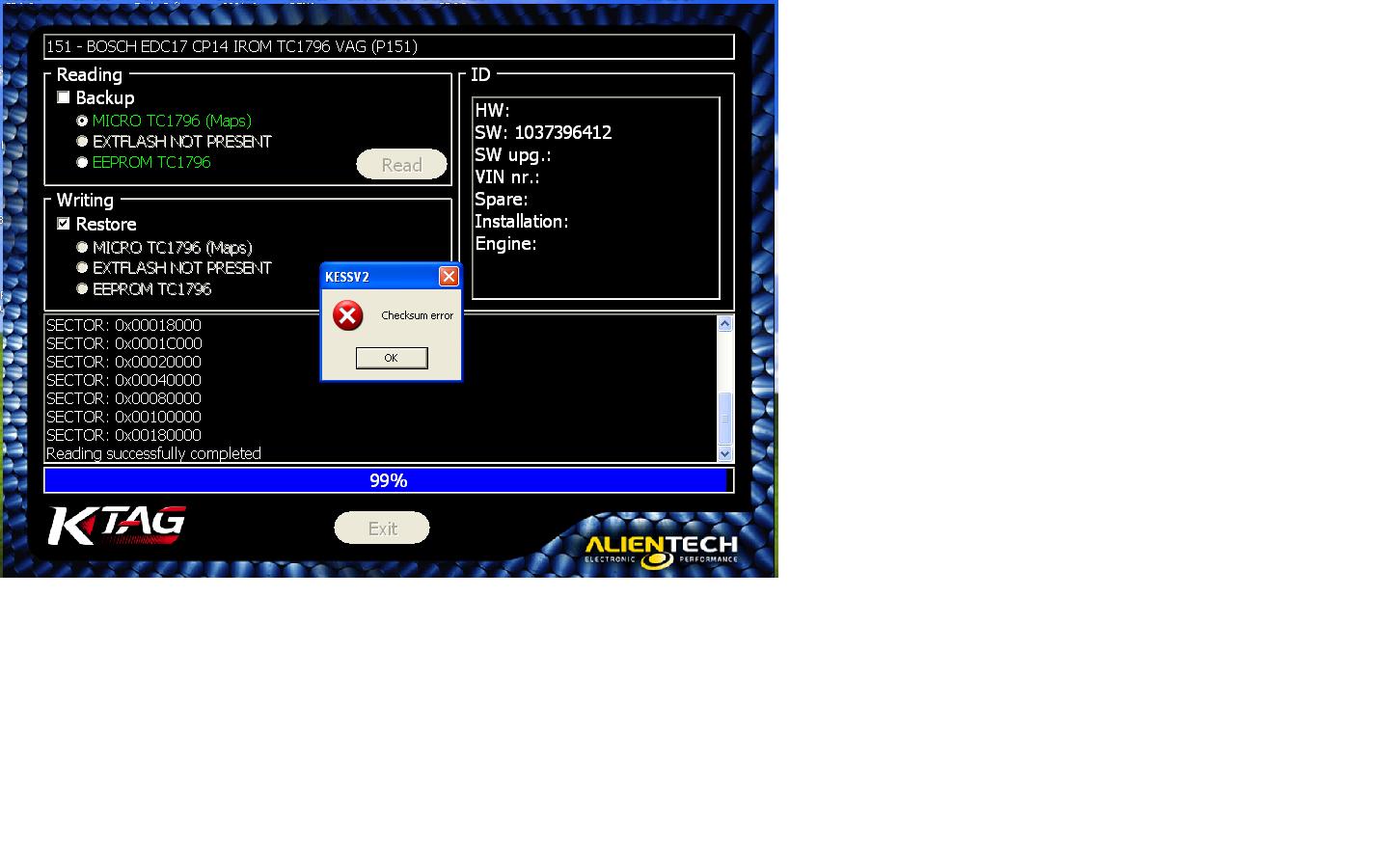
When the user tries to solve KTAG 7.020 master checksum error by following the working solution, one step is to download Alientech Ksuite 1.85 online, but the official site is not available with this version of ksuite, where to download?
ktag-checksum-error

Here obdexpress.co.uk engineer upload one for you:
https://mega.nz/#!xB5CACzC!tjH95b7FBZ5Nnunelz97pt8FRJ7Hp5Z6KOOBm1zL3lo
It is tested working 100% ok by users.

Then, what is the solution to solve KTAG 7.020 master checksum error?
If You have problem with checksum when R/W only flash, Your OS don’t have C++ library. Two way:
-download C++ library from net-> install it

or

download from alientech website ksuite 1.85 install it, it will install C++ automatically -> remove dir C: Ksuite-> Replace it with Ksuite dir which You get from Your clone supplier->restart WIN-> be happy with Your master ktag

Solution tested and works on 3 computers.
DONT START KSUITE WITH YOUR CLONE BEFORE YOU REPLACE KSUITE DIRECTORY!!!