Showing posts with label Scania SDP3. Show all posts

Monday, April 29, 2019

Scania SDP3 v2.39.1 Download & Install

Scania VCI3 SDP3 software update to v2.39.1, here, Obdexpress.co.uk shares some tips of Scania SDP3 v2.39.1,incl:how to install, activate and crack Scania SDP3 v2.39.1 on Windows 7 32 bit …
scania-diagnos-3
THE MOST IMPORTANT:
you should have functional SDP3 v2.39.1 software for Scania VCI 3:
https://share.weiyun.com/5gC8I8y (password: 5g4dh4)
(This software does not need shipping, after your order, our engineers will help install and activate by TeamViewer.
)
Scania SDP3 V2.39.1 Confirmed:
Check and adjustment
Conversion
Maintenance
Campaign
Bodywork
Fault Codes
Fault Reporting
Programming of Control units
operating system:
SDP3 2.39 works well on Windows 7 32 bit
scania-sdp3-windows7-install-9

(confirmed by pros at obdexpress.co.uk)
Video demo:
steps:
then you will have all files for installation
scania-sdp3-windows7-install-1

Step 1: install Adobe Reader
scania-sdp3-2.93.1-windows7-install-2

Step 2: install Microsoft .NET

scania-sdp3-2.93.1-windows7-install-2

scania-sdp3-2.93.1-windows7-install-2

Step 3: install sdp 3 v2.39 application

scania-sdp3-2.93.1-windows7-install-5

scania-sdp3-2.93.1-windows7-install-6

Step 4: run prerequisites (sdp 3 patch) as an administrator
scania-sdp3-2.93.1-windows7-install-7

scania-sdp3-2.93.1-windows7-install-8

PC restarts
Step 5: run x32 Windows command script
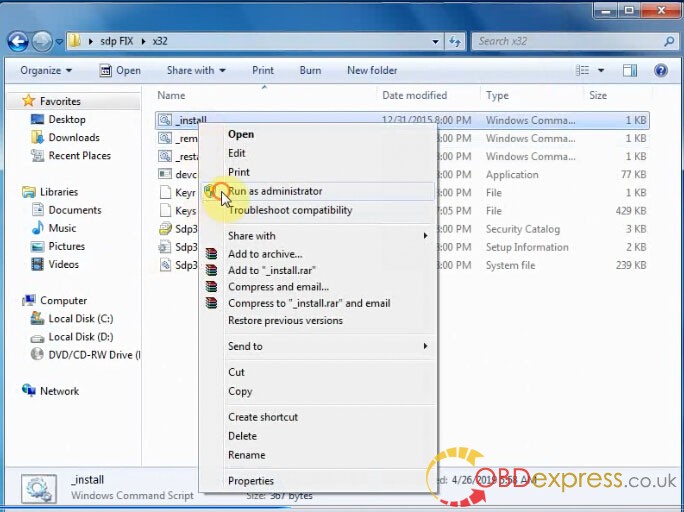
scania-sdp3-2.93.1-windows7-install-10

(install the driver software anyway)
Step 6: activate sdp3 2.39 with hardware id
copy hw id for activation
scania-sdp3-2.93.1-windows7-install-11

then will get an activation file
scania-sdp3-2.93.1-windows7-install-

merge – success
scania-sdp3-2.93.1-windows7-install-13

copy SCOMM_SSK.dat and SCOMM_SSK_HL.dall
scania-sdp3-2.93.1-windows7-install-14

open SDP3 Properties – open file location – copy and replace files
scania-sdp3-2.93.1-windows7-install-15

Step 7: crack SDP3 software
scania-sdp3-2.93.1-windows7-install-16

scania-sdp3-2.93.1-windows7-install-17

PC restarts
Step 8: select a setup language in SDP3 configurator
scania-sdp3-2.93.1-windows7-install-18

Step 9: run SDP 3 and update Scania VCI
scania-sdp3-2.93.1-windows7-install-19

scania-sdp3-2.93.1-windows7-install-20

scania-sdp3-2.93.1-windows7-install-521

scania-sdp3-2.93.1-windows7-install-22

scania-sdp3-2.93.1-windows7-install-24

Now, Scania VCI3 SDP3 2.39 is ready for use!


Source:http://blog.obdexpress.co.uk/2019/04/29/scania-sdp3-v2-39-1-download-install/

Tuesday, January 22, 2019

Scania SDP3 2.38.2 Software Free Download:No pass

Scania SDP3 2.38.2 free source download incl. activation; also 100% safe source with installation and activation with teamviewer.

Source 1: Free, unknown security
SDP3 2.38.2 free download : No pass
https://mega.nz/#!xo8GXIjQ!twFx3cbGUptyDkGmFa2gNn3Zy0CjB-44_Kfi_vZyT4g
768.4 MB

SDP3 2.38.2 Activation : No pass
https://mega.nz/#!ggNRlQKT!qyW5szrArUf6Y7kEwlXFyGmMkVA0H08XbvqmEEWRpqk
9.0MB
1) Install run admin 1.bat
2) Restart the PC
3) Install sdp3 2.38.2 and restart
4) Install driver 32 or 64 Bit
5) Run “Hardware ID Reader” copy ID machine
6) Run “Protection REG” paste up ID machine —> click in “Decode Fingerprint” —> click in “Generate” —> a .reg file is generated in the folder
7) Run clik .reg file and apply in registy
8) Copy and replace in the program folder 2 file “Fix 2.38.2”
9) Run install “ScaniaSDP3Time Add 2 Year”
10) Restart PC

Thanks to the contribution of skud1 (mhhauto.com forum member).
This poster is just sharing helpful info.

Source 2: 100% safe
Scania SDP3 V2.38.2

* They help install and active with TeamViewer(No charge)

* **Works on WIN 7 sp1 ultimate edition 32 or 64; WIN 7 pro sp1  just 32 bit ; WIN 10 pro
Need Netframework 4.5 installed on system. windows 7 will be better.
In order to install SDP3, administrator rights are required.
Note: The USB key and VCI must not be connected to the computer during the installation of SDP3, especially not if SDP3 is installed for the first time.
The communication problems related to Windows 8 is now solved. Some problem solving reconfigurations was made Thursday the 16th of October.

* Multi-language: English, German, Spanish, French, Japanese, Dutch, Persian, Polish, Portuguese, Swedish, Norwegian, Suomi, Turkish, Italian, Czech, Russian, Chinese.

Capabilities:
Check and adjustments…OK
Conversion…OK
Maintenance…OK
Campaign…OK
Bodywork…OK
Fault Codes…OK
Fault Reporting …OK
Programming of Control units  …OK


Thursday, February 11, 2016

Scania SDP3 2.24 (Fix) Free Download

Scania Diagnos & Programmer 3 SDP3 2.24 and SDP3 Fix files free download here.

Free download SDP3 files:
SDP3 2.24.1
https://mega.nz/#!EQ1ShIyR!eg2987wBD4xMl29FNqMYmWD97PYjPfPPOY-QrqQeFNo
Fix Scania SDP3 2.24
https://mega.nz/#!P4JSzShL!sL7D_ID9xGVtlyQwCSJzwHb5junpKdtTvK8By7qh0gA

Operation system:
WIN 7 32bit only

Multi-language:
English/ German/ Spanish/ French/ Japanese/ Dutch/ Polish/ Portuguese/ Swedish/ Norwegian/ Suomi/ Turkish/ Italian/ Czech/ Russian/ Chinese.

Compatible devices:
Scania truck diagnostic tool:
VCI 2
VCI 3
Why to get SDP3 2.24.1?
Problems solved with this extra release
Solved the following FQ items:
FQIT241264
Not able to see guide Cylinder output test in SDP3, affected products all EMS S6.
FQIT241255
Not possible to access adjustable parameters in ELC4 due to a faulty parameter settings
module in SDP3. For instance Lowering the tag axle. Affected vehicles PGR-trucks and FKNbus with ELC4
FQIT242105
Not possible to spare part program new ECU EMS S7 replacement.

How to install Scania VCI 2 SDP3 V2.24 in Win 7?
http://blog.obdexpress.co.uk/2016/01/20/install-sdp3-v2-24-for-vci-2-vci-3-on-win-7/

What can you do with SDP3 2.24 with VCI 2 / VCI 3?
Stored fault codes, proposals for remedial action and delete option.
Control unit configuration and settings.
Information about electrical components and their location.
Input and output signals.
Activation of components.
Spare part programming.
Circuit diagrams. For each circuit there is a diagram which clearly shows how the particular circuit is implemented in the respective vehicle.
Chassis data. The vehicle gives the program a description of itself and how it is configured.
User functions. In order to meet service market requirements to work more effectively, there is an option to troubleshoot via user functions, e.g. cruise control.