Showing posts with label BMW diagnostic tool. Show all posts

Monday, August 1, 2016

08.2016 BMW ICOM A2 ISPI ETK Parts Catalog Free Download

Free download 2016.08 BWW ETK electronic parts catalog on Windows XP for the  latest information on spare parts and accessories of machines and motorcycles.

Free download 
BMW_ISPI_ETK_08_2016.zip
https://mega.nz/#!GssQXKoA!L_MByZVsoXNX6Il_3a4q59SWVEdgs4taBK5BRfCvGTw 
(unknown security, time limited)


(Never expire, cracked, no pass)
Note:
Safe BMW ETK is also available in BMW software ISTA-D 3.55.31 ISTA-P 3.59.0.600
to work together with ICOM A2 or ICOM A3 pro+ for diagnosis or programming


You are advised to install BWW ETK electronic parts catalog 2016.08 on Windows XP as follows:
Step 1 - Open ETK_04_2016.iso
Insert BMW ETK disk BMW2016 E:, then open it
Copy “ETK_04_2016.rar” to lock disk D: and unzip there
Open DAEMON Tool Lite on Desktop
Add image: Local disk d:/ETK_04_2016.iso
BMW-etk-3.1.30-setup

Mount “ETK_04_2016.iso”
Internet explorer: active content.... Select NO
2016.04 BMW ETK information
BMW-etk-3.1.30-setup


Step 2 - Install ETK 2016.04
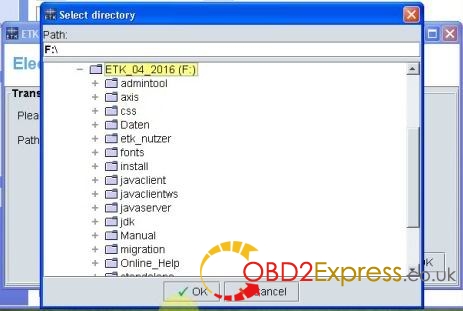
Open ETK_04_2016 F:
Open “setup”
Select ETK setup language
2016.08-BMW-etk-3.1.30-setup

2016.08-BMW-etk-3.1.30-setup

Click Next to install ETK
2016.08-BMW-etk-3.1.30-setup

Next *3
Being setup...
Port selection
2016.08-BMW-etk-3.1.30-setup

Properties: select “Use the US interface”, then ok
Follow the screenshots to do the selection
2016.08-BMW-etk-3.1.30-setup

2016.08-BMW-etk-3.1.30-setup

2016.08-BMW-etk-3.1.30-setup

2016.08-BMW-etk-3.1.30-setup

2016.08-BMW-etk-3.1.30-setup

2016.08-BMW-etk-3.1.30-setup

2016.08-BMW-etk-3.1.30-setup

2016.08-BMW-etk-3.1.30-setup

2016.08-BMW-etk-3.1.30-setup


Step 3 - Load parts data
Select CD-ROM drive
2016.08-BMW-etk-3.1.30-setup

Wait and spare parts is being loaded...
Parts data have been read
2016.08-BMW-etk-3.1.30-setup


Step 4 - Run BMW ETK
Open ETK (local) on Desktop
2016.08-BMW-etk-3.1.30-setup

2016.08-BMW-etk-3.1.30-setup

Close BMW ETK 3.1.30

Step 5 - Run ETK Admin
Open ETK Admin on Desktop
Go to Extras->language.. to select a language
2016.08-BMW-etk-3.1.30-setup

Close ETK Admin tool

Done!


Sunday, June 26, 2016

Free Download BMW INPA 5.0.2 EDIABAS to install on Windows XP

Free download INPA 5.0.2 BMW software and install on the laptop with Windows XP operating system for BMW auto diagnosis.

Free download inpa v5.0.2:
inpa-5.02.zip + inpa-driver.zip
Inpa v5.0.2 Ediabas v6.4.7.rar
http://www.thegrayshadow.com/reg.php?name=Bmw+Softing+Inpa+v5.0.2+Ediabas+v6.4.7.rar
INPA 5.0.2 bmw (tested)
Note:
BMW INPA EDIABAS 5.0.2 full package includes INPA, NCSExpert, WinKFP, Tool32

New INPA basic info:
* Language option: English and German
* System requirements: Windows XP -safe, Windows 2000/VISTA/7
If you have Win7 operating system INPA will work properly but you need XP mode to work with NCSExpert.
* Support of all ECU use cases in Engineering, Test, Production and After Sales
* Specification of ECU’s diagnostic data
* Reading and clearing error memory
* FLASH data uploading and downloading
* Reading measurement value
* Input/output control
* Calibration of single ECU variables
* CAN (controller Area Network) bus mode emulation
* Integrated solutions for on-board/off-board
* Customer specific protocols supported
* Long term application by supporting widespread ASAM standards

How to install INPA 5.0.2 BMW:
Unpack INPA and run Programminstallation/setup.exe
1.Choose language:
2.Select "I accept agreement" and click "Next":
3.Next step:[/caption]
4.Next step:
5.Next step:
6.Next step:
7.Next step:
8.Next step:
9.Next step:
10.Next step:
11.Next step:
12.Next step (select STD:OBD even if you have DCAN cable) :
13.Next step (select COM port that your cable plugged in):
14.Next step:
15.Next step (click "skip" 3 times):
16.Next step:
17.Next step (restart your computer):
ATTENTION please when using INPA:
1) Before using this equipment, keep the battery of notebook fully charged to avoid battery broken. Don’t charge the battery while diagnosing (the charger may interfere with diagnosis). Before charging, discharge the battery. You may knock down the battery and connect the power line during long time diagnosing. To make sure the battery life.
2) While testing, make sure the diagnostic lines well connected.
3) Be sure to start diagnosing after all icons on bottom right of screen displayed regularly.
4) After finished diagnosing, back the screen to the main interface, then shut down the key and pull out the connector.
5) Don’t cut the power or connector during test.
Don't touch the high temperature components in carriage during test.

Models covered:
1 series E81 E82 E87 E88
3 series E30 E36 E46 E90 E91 E92 E93
5 series E34 E39 E60 E61
6 series E63 E64
7 series E38 E65 E66
8 series E31
Mini R50 R52 R53 R55 R56 R57
X series E53 E83 E70 E71
Rolls Royce RR1 RR2
Z series E52. E85 E86 E89
F01/L6